


Table of Contents
- What Is OpenDream AI Art?
- How the Underlying Technology Works
- Core Features: What You Actually Get
- Pricing Breakdown: Free vs. Paid
- How to Use OpenDream Step by Step
- OpenDream vs. Midjourney vs. DALL-E: An Honest Comparison
- Where OpenDream Excels — and Where It Falls Short
- Who Should Actually Use OpenDream?
- Prompt Writing Tips That Actually Move the Needle
- Copyright, Ownership, and Commercial Use
- FAQ
What Is OpenDream AI Art?
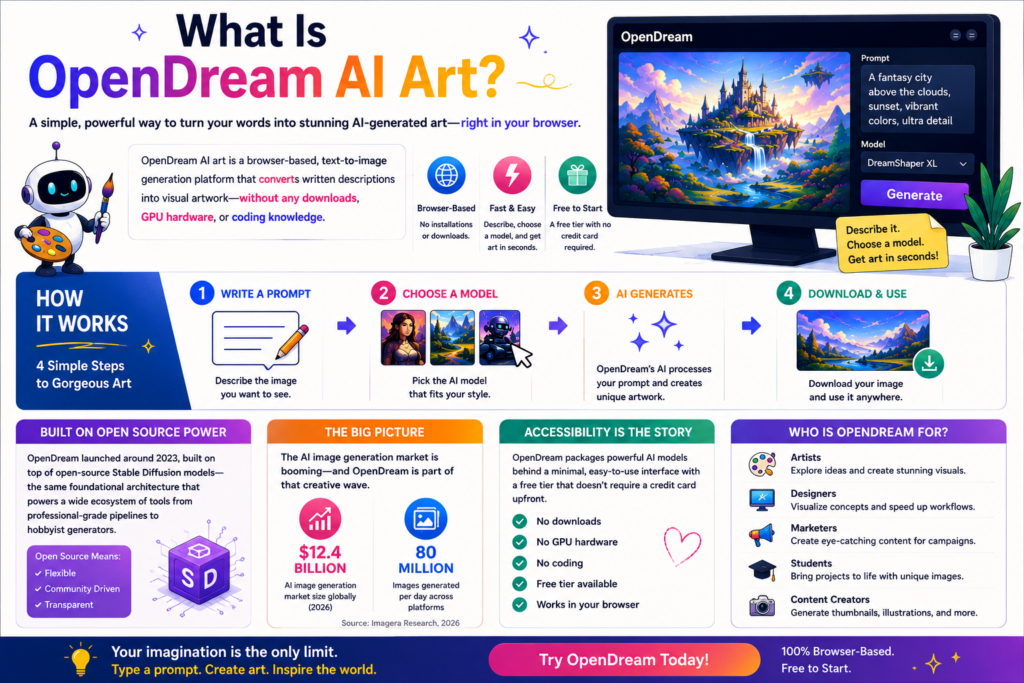
OpenDream AI art is a browser-based, text-to-image generation platform that converts written descriptions into visual artwork without requiring any downloads, GPU hardware, or coding knowledge. You open a browser, type a description, choose a model, and receive generated images within seconds.
The platform launched around 2023, built on top of open-source Stable Diffusion models — the same foundational architecture that powers a wide ecosystem of tools from professional-grade pipelines to hobbyist generators. What OpenDream does differently is package that power behind a minimal, accessible interface with a free tier that doesn’t demand a credit card upfront.
That accessibility is the genuine story here. The AI image generation market is now valued at approximately $12.4 billion globally and producing roughly 80 million images per day across platforms (Imagera Research, 2026). OpenDream positions itself as the on-ramp for people who want to participate in that creative wave without committing to a subscription or wrestling with Discord.
How the Underlying Technology Works
OpenDream runs on diffusion models — specifically variants including Dreamlike Photoreal 2.0, Dreamlike Anime 1.0, Stable Diffusion 2.1, and Deliberate. These models work through a process called latent diffusion: during training, the model learns to associate visual patterns with text tokens by repeatedly adding and removing noise from millions of image-text pairs. At generation time, it starts from random noise and gradually “denoises” toward an image that matches your prompt.
Two things are worth understanding about this architecture:
What it’s good at: Generating visuals that feel artistically coherent — painterly landscapes, stylized character art, soft-lit environments — because diffusion models are particularly strong at capturing aesthetic patterns from their training data.
Where it struggles: Precise spatial reasoning (correct number of fingers, accurate text rendered inside an image), highly specific real-world references, and anything requiring compositional accuracy that wasn’t common in training data.
Stable Diffusion and its derivatives currently account for approximately 80% of all AI-created imagery worldwide (SQ Magazine, 2026). OpenDream’s reliance on these open-source foundations means it inherits both the strengths and the well-documented edge-case weaknesses of the broader ecosystem.
Core Features: What You Actually Get
Multiple AI Models
The model selection is the most practically important feature. Each model has a genuinely different output character:
- Dreamlike Photoreal 2.0 — The go-to for photorealistic outputs: portraits, landscapes, product mockups. Skin tones and lighting hold up reasonably well with careful prompting.
- Dreamlike Anime 1.0 — Optimized for anime-style character generation. Clean line work, saturated colors, and stylized proportions are its defaults.
- Stable Diffusion 2.1 — The base model. More neutral, less stylistically opinionated. Useful when you want to control the aesthetic direction yourself through prompting.
- Deliberate (paid plans) — A community fine-tune of Stable Diffusion focused on detailed artistic outputs. The quality ceiling on this model is noticeably higher for concept art and illustration work.
Customizable Templates
OpenDream provides pre-built prompt templates across categories including logos, anime characters, animals, 3D structures, and environments. These are useful entry points for new users who haven’t yet developed prompt intuition, though experienced users quickly move past them.
Community Gallery
The public gallery shows real user-generated outputs filtered by category. Practically, this functions as a prompt research tool — you can find images in a style you want and reverse-engineer the prompts that created them.
Negative Prompts
The platform supports negative prompting through a separate input field, letting you specify what the model should avoid. Negative prompts like blurry, low quality, deformed hands, watermark measurably improve output consistency for users who know how to use them.
Batch Generation
Free users can generate up to three images simultaneously. Paid plans unlock larger batches and shorter queue times.
Pricing Breakdown: Free vs. Paid
OpenDream offers daily free credits with no credit card required. Based on current platform documentation and third-party reviews:
| Tier | Daily Credits | Models Available | Simultaneous Generations |
|---|---|---|---|
| Free | 24 credits/day | Dreamlike Photoreal, Dreamlike Anime | Up to 3 |
| Paid (~$12/month) | 3,000 credits/month | All 4 models including Deliberate + SD 2.1 | Higher batch limits |
The credit system means power users will exhaust the free tier quickly. Three simultaneous images at moderate quality consume credits faster than the numbers suggest. For casual experimentation and ideation — generating a handful of concept images a day — the free tier is genuinely usable. For any production workflow, the paid tier becomes necessary quickly.
How to Use OpenDream Step by Step
Getting from zero to your first image takes under three minutes:
Step 1 — Go to opendream.ai. No download, no account required for basic generation. You land directly on the generation interface.
Step 2 — Choose your model. Select based on the style you’re targeting. Photoreal for realistic outputs, Anime for illustrated character work, Deliberate (if available on your plan) for detailed artistic pieces.
Step 3 — Write your prompt. Describe your image in plain language. Specificity helps: A watercolor illustration of a narrow Tokyo alleyway at dusk, lanterns lit, steam rising from street food stalls will outperform Tokyo street on almost any model.
Step 4 — Add negative prompts. Use the negative field to exclude common artifacts: ugly, blurry, deformed, oversaturated, watermark covers most quality failures.
Step 5 — Adjust settings if available. On paid plans, you can increase steps (more computation = higher detail) and adjust resolution.
Step 6 — Generate and iterate. Run multiple variations. Diffusion models have inherent randomness — the same prompt produces different outputs on each run. Treat your first generation as a draft.
Step 7 — Download. All images can be downloaded in high resolution. Watermarks can be toggled on or off before generating.
The workflow is fast. Getting to a usable concept image takes five to ten minutes once you’ve developed basic prompt fluency.
OpenDream vs. Midjourney vs. DALL-E: An Honest Comparison
Comparing these platforms fairly requires separating what each is actually built for.
| Feature | OpenDream | Midjourney | DALL-E 3 (ChatGPT) |
|---|---|---|---|
| Access method | Browser | Discord + Web app | ChatGPT / API |
| Free tier | Yes (24 credits/day) | No | Limited via ChatGPT |
| Model architecture | Stable Diffusion variants | Proprietary | DALL-E 3 |
| Output quality ceiling | Moderate | Very high | High |
| Photorealism | Good with Photoreal model | Excellent | Excellent |
| Text in images | Poor | Moderate | Strong |
| Artistic stylization | Strong | Very strong | Good |
| Prompt control | Moderate | High (with v7+) | Natural language |
| Commercial use | Yes (per terms) | Yes (paid plans) | Yes (per terms) |
Midjourney currently leads user preference share at 26.8% globally, followed by DALL-E at 24.4% (SQ Magazine, 2026). OpenDream doesn’t appear in the major market-share tables, which is itself informative.
The honest summary: OpenDream is the most accessible starting point, but the output quality gap between its Stable Diffusion 2.1 base and the current generation of proprietary models (Midjourney V8, DALL-E 3) is real. For casual exploration and ideation, that gap doesn’t matter much. For professional or commercial visual work, it does.
Where OpenDream Excels — and Where It Falls Short
Where It Genuinely Works
Concept art and moodboarding. OpenDream’s tendency toward artistic abstraction — softer light, looser brushwork-like textures — makes it useful for the thinking phase of a creative project. Generating ten loose concepts for a client presentation takes minutes.
Anime and stylized illustration. The Dreamlike Anime model produces clean, consistent stylized output that holds up well for character concept work, especially with detailed prompts.
Environmental and landscape scenes. Give the model time (more steps) and a high-quality prompt, and landscape outputs are often genuinely usable for backgrounds and scene-setting visuals.
Budget-constrained experimentation. The free tier is real. For students, indie developers, and people testing whether AI image generation fits their workflow, OpenDream provides a no-cost entry point.
Where It Falls Short
Photorealism for professional use. The Dreamlike Photoreal model produces good results, but the platform isn’t built for polished commercial photography replacements. Product shots and brand visuals at professional quality require tools built specifically for that pipeline.
Text rendered within images. Like most Stable Diffusion derivatives, OpenDream struggles to render legible, accurate text inside generated images. This is an architectural limitation of the model family.
Hands and complex anatomy. The well-documented Stable Diffusion hand problem — extra fingers, distorted joints — appears in OpenDream outputs too. Negative prompting helps partially; it doesn’t solve the problem.
No marketing or campaign format support. There are no social media dimensions, ad templates, or campaign-specific format presets. The tool generates art; it doesn’t produce publish-ready marketing assets.
Who Should Actually Use OpenDream?
The platform has a specific, honest user fit:
A good fit for:
- Students and beginners exploring AI art generation for the first time
- Writers and game developers generating reference imagery and concept art
- Social media creators who need stylized visuals rather than photorealistic imagery
- Small businesses that want rough concept visuals for internal presentations or pitch decks
- Traditional artists using AI as an ideation tool rather than a final-output engine
A poor fit for:
- Brand teams producing campaign-ready marketing assets
- Photographers or agencies replacing product photography at professional quality
- Users who need text-in-image accuracy
- Developers needing an API for production integration (while API access exists, more mature platforms offer better documentation and reliability for production use cases)
The creative market context matters here: 86% of creators now actively use generative AI in their workflows (Adobe Creators’ Toolkit Report, 2025), which means most creative professionals have access to multiple tools. OpenDream occupies the exploration and ideation end of that toolkit — not the production end.
Prompt Writing Tips That Actually Move the Needle
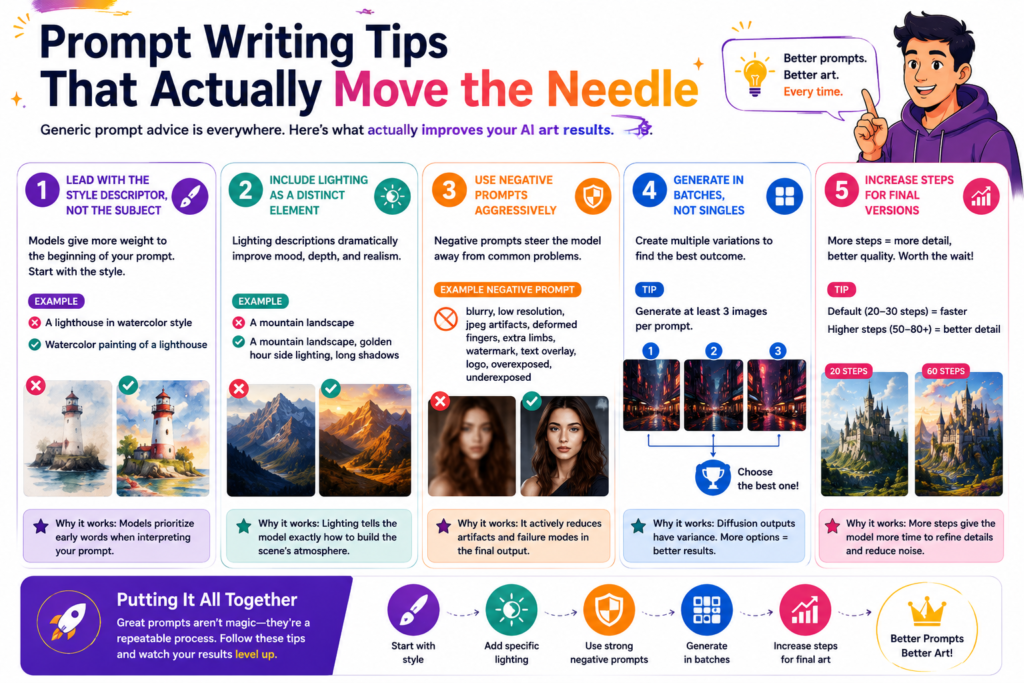
Generic prompt advice (“be specific!”) is everywhere. Here’s what actually changes output quality in practice:
Lead with the style descriptor, not the subject. Watercolor painting of a lighthouse tends to outperform a lighthouse in watercolor style because models parse the beginning of prompts with more weight.
Include lighting as a distinct element. Golden hour side lighting, long shadows tells the model something specific about the scene that beautiful light doesn’t. Lighting descriptions are among the most reliable quality multipliers.
Use negative prompts aggressively. A strong negative prompt for photorealistic work: blurry, low resolution, jpeg artifacts, deformed fingers, extra limbs, watermark, text overlay, logo, overexposed, underexposed. This is not decoration; it actively steers the denoising process away from failure modes.
Generate in batches, not singles. Three images per prompt minimum. Diffusion model outputs have meaningful variance; treating any single output as representative will mislead your quality assessment.
Increase steps for final versions. Default step counts (usually 20–30) are fast but produce lower detail. For outputs you’ll actually use, increase steps significantly on paid plans. The computation cost is higher; the quality ceiling is meaningfully higher too.
Copyright, Ownership, and Commercial Use
OpenDream’s current terms allow commercial use of generated images across all plans. You own what you create.
Three important caveats worth understanding:
The legal landscape is still unsettled. In March 2025, the U.S. Court of Appeals for the D.C. Circuit affirmed that human authorship is an essential component of a valid copyright claim, meaning purely AI-generated images cannot themselves be copyrighted under current U.S. law. This doesn’t prevent commercial use; it means others can potentially reproduce your AI-generated work. For brand assets, this is worth knowing. See the U.S. Copyright Office AI guidance for the latest official position.
Training data lawsuits continue. Over 70 copyright infringement lawsuits have been filed against AI companies as of late 2025 (Copyright Alliance, 2025). Stable Diffusion, which underpins OpenDream’s models, is among the technologies named in various actions. The legal resolution of these cases could affect how these models are trained and deployed in future.
Platform terms can change. Your commercial use rights are governed by OpenDream’s Terms of Service, which can be updated. For high-stakes commercial projects, verify current terms directly before committing to a workflow.
FAQ
Is OpenDream AI art free to use? Yes. OpenDream offers 24 daily credits on its free tier with no credit card required. Free users can generate up to three images simultaneously using two models: Dreamlike Photoreal and Dreamlike Anime. Advanced models and higher batch limits are available on paid plans starting around $12/month.
Does OpenDream add watermarks to generated images? Watermarks can be toggled on or off before generating on all plan tiers. This is a user-controlled setting, not an automatic restriction. Downloaded images can be clean files without branding.
What AI models does OpenDream use? OpenDream uses Dreamlike Photoreal 2.0 and Dreamlike Anime 1.0 (available on free plans), plus Stable Diffusion 2.1 and Deliberate on paid plans. All are variants built on the open-source Stable Diffusion architecture.
Can I use OpenDream images commercially? OpenDream’s current terms permit commercial use of generated images across all plans. However, since U.S. courts ruled in 2025 that purely AI-generated images cannot be copyrighted, the legal protections for your images differ from human-created work. Verify current platform terms for any high-value commercial application.
How does OpenDream compare to Midjourney? OpenDream is browser-based, free to start, and optimized for accessibility. Midjourney produces significantly higher-quality outputs and has a richer ecosystem but requires a paid subscription and operates through Discord or its web app. For casual exploration, OpenDream is the easier entry point. For professional creative output, Midjourney’s quality ceiling is substantially higher.
Does OpenDream require a login or account? Basic image generation can be done without an account. An account is required to save images, access the community gallery history, and unlock paid features.
Can OpenDream generate anime-style art? Yes. The Dreamlike Anime 1.0 model is specifically fine-tuned for anime and stylized illustration. Character designs, fantasy scenes, and stylized backgrounds perform consistently well within this model.
Conclusion
OpenDream AI art occupies a specific and honest position in the current landscape: a genuinely accessible, no-friction entry point into AI image generation that works well for exploration, ideation, and stylized creative work — without claiming to be something it isn’t.
The free tier is real and usable. The models, while built on Stable Diffusion architecture that’s now a few generations behind the frontier, still produce output that’s useful for moodboarding, concept art, anime character design, and visual experimentation. The interface stays out of the way.
Where it falls short is equally clear. Professional photorealism, text-in-image accuracy, marketing-ready campaign formats, and production-level quality control require tools built specifically for those use cases. If that’s what you need, platforms like Midjourney V8, DALL-E 3, or Adobe Firefly serve those workflows better.
The practical starting point: Use OpenDream’s free tier for a week. Generate images across three to five different prompt styles. If the output quality meets your actual use case, the paid tier is reasonable. If you find yourself consistently running into the quality ceiling, you know exactly which direction to move.
